
Can I restrict my help centre to certain email domains?
Updated 4 months ago
Browse All
Yes — you can limit your help centre to people who sign in with a work email on domains you approve. Visitors enter their email, get a magic link, and only addresses on your allowed list get through.
Prerequisites
- You need access to the project's Settings page
More details
Open the Visibility settings
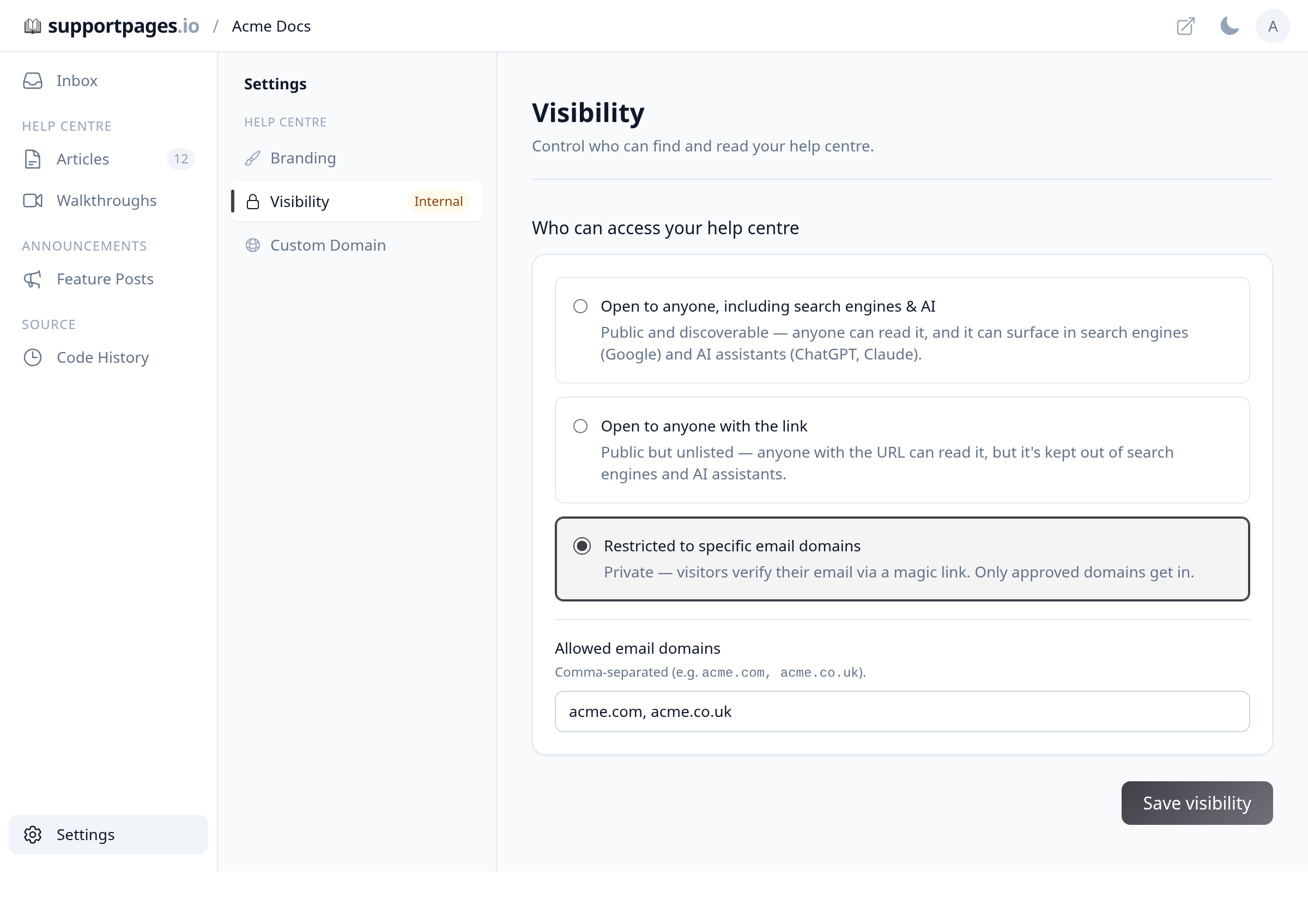
From your project, open Settings in the sidebar. Under Help centre, click Visibility.
Turn on domain-restricted access
Under Who can access your help centre, select Restricted to specific email domains. In Allowed email domains, enter the domains you want to allow, separated by commas (for example, acme.com, acme.co.uk).
Save your changes
Click Save visibility. Visitors who aren't on an approved domain will see a message asking them to use their work email.
Tips
-
Domain matching is case-insensitive —
Example.comandexample.comare treated the same. - Visitors on approved domains receive a secure sign-in link by email; the link expires after 15 minutes.
Summary
Domain-restricted visibility keeps your help centre private while still letting customers or employees on your approved domains read your docs.
Was this article helpful?
Built with supportpages.io — SaaS documentation software.
Have a question?
Search our articles, or ask and get an answer straight away.