
Understanding your Inbox
Updated 4 months ago
Browse All
After you merge code, SupportPages turns those changes into draft content for your help centre and announcements. The Inbox is where all of that work waits for you — one place to see what needs a look before anything goes live.
Prerequisites
- A connected repository with at least one merged pull request or analyzed commit
Key concepts
Your review queue after a merge
When a pull request merges, SupportPages reads the diff and writes a changelog-style summary of what changed. That analysis can queue new Suggestions, start drafting Articles, or create Feature Posts — depending on what the change means for your users. You do not need to watch Code History for this; new work shows up in the Inbox automatically.
One screen, three sections
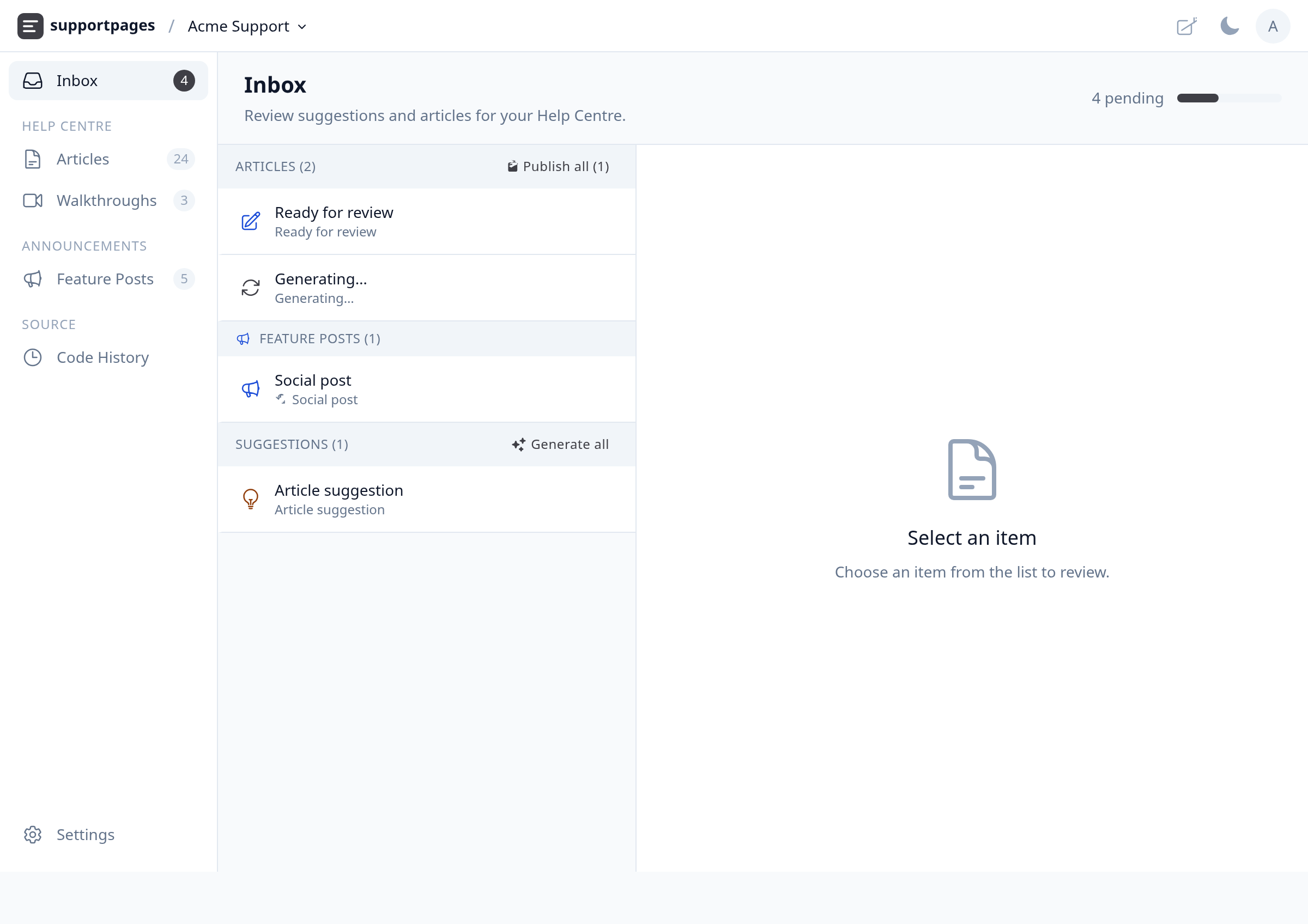
Open Inbox from the left sidebar to see everything pending. The page title reads Inbox, with the subtitle Review suggestions and articles for your Help Centre. The list on the left is split into up to three groups — Articles, Feature Posts, and Suggestions — and the panel on the right is where you read and act on whichever item you select.
Articles — draft help-centre guides
Articles are full how-to or reference guides SupportPages drafted from your recent changes. Each row shows the article title and its help-centre section. When generation finishes, you can review the prose, approve it to publish, or reject it. While a draft is still generating, you will see a spinner on that row instead of the ready-for-review icon.
Feature Posts — launch copy for social channels
Feature Posts are short announcement drafts — a title, hook, body, and hashtags — meant for sharing a shipped feature. They sit in their own Feature Posts group below articles when that feature is turned on for your project. Like articles, each post waits in the Inbox until you approve or reject it.
Suggestions — topics you can accept or skip
Suggestions are article or social-post ideas SupportPages spotted in a merge but has not written yet. Each suggestion shows a title and, for article ideas, the target section. Click one to read the description and why it was recommended — many link back to the source pull request. Accept to start generation, or Reject to dismiss the idea.
When the Inbox is empty
If nothing is waiting, you will see All done! with No pending items to review. in the list and a confirmation in the right panel that you have reviewed everything. The badge on Inbox in the sidebar clears too. New items appear the next time a merge triggers analysis — check back after your next release.
Tips
- The pending count next to the page title adds up unreviewed suggestions, articles, and feature posts so you can see at a glance how much is left.
- Use Generate all on the Suggestions header to accept every topic at once when you trust the batch.
Summary
The Inbox collects everything SupportPages produces from merged code — draft Articles, Feature Posts, and Suggestions — in one review queue. Open Inbox after each release to work through the list and publish what your users need.
Was this article helpful?
Made by supportpages.io — turning pull requests into automated user documentation.
Have a question?
Search our articles, or ask and get an answer straight away.